Hi Guys,
I cant get to work an APA102 on a D1 mini.
I connected:
APA102 D0 to D4
APA102 C0 to D3
However all the led light up white and I can not change control them
THANKS!
d1m|690x275
Hi Guys,
I cant get to work an APA102 on a D1 mini.
I connected:
APA102 D0 to D4
APA102 C0 to D3
However all the led light up white and I can not change control them
THANKS!
d1m|690x275
Also not sure what to add in
LED outputs:
DATA:
CLK:
Screen Shot 2021-09-26 at 8.43.57 PM|482x207
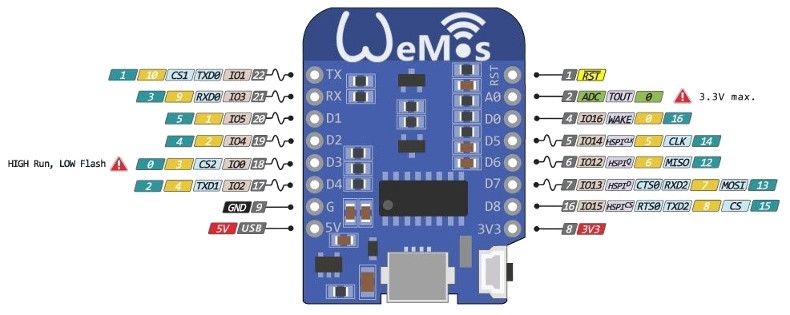
The posted image does not match the first post. Data to D4 & Clock to D3 (1st post), and Data to pin 3 & Clock to pin 2 (image).
D4 = GPIO Pin 2
D3 = GPIO Pin 0
RX = GPIO Pin 3
This link shows preferred GPIO pins for outputs and may help you resolve the problems you are having.
No.
That puts D0 on PIN GPIO2 and C0 on PIN GPIO 0. For the wiring you have, that would be D0 to PIN 2 and C0 to PIN 0.
Refer to the link with the images showing the GPIO # at the device designations, D#, A#, RX/TX.
I have the same setup. The board I have says D3 and D4, but those are pins 0 and 2 to the software. Mine are working fine now:
I’m dealing with the same thing as well.
D1 Mini
APA102 Strip
I’ve wired the two contested wires to
It doesn’t seem matter what pin you connect the Data/Clock pins to or which ones you program them to within WLED UI, they never seem to do anything.
UPDATE:
Firmware loaded: soundReactive_WLED_0.12.0_ESP8266.bin
I was originally wiring and assigning the DAT wire to D3 and CLK wire to D2, then assigning the (absolutely sure) correct pins. After I found out that D2 CANNOT be used as a functional pin, I tried moving both of the wires to literally every other pin, then assigning accordingly in LED Prefs - still no change.
So, after fooling around with wiring and settings over and over again, even trying different boards entirely - I decided to use my brain and grabbed the newest WLED B5 build. I loaded it on, assigned the used pins in the LED Prefs and it worked the first time.
Hope this helps anyone else…
My 2 takeaways:
1. Never use the D2 pin for anything other than for flashing the board.
2. If you’re having specific SMD or sensor problems, try a different build.
Post your LED settings page and wiring set-up.